Turning an old laptop into a home media server
I wanted a home library of great-quality movies and shows: proper Blu-ray remuxes with full bitrate and lossless audio, playing on the TV whenever we want. The hardware was a Dell Inspiron 7572 sitting in a drawer: an i5-8250U, 16 GB of RAM, a 128 GB SSD and a 1 TB hard drive.
It started on Windows. I wiped the SSD and moved to Ubuntu before building any of this. I also didn't know what the *arr stack was. I described what I wanted to Claude, it suggested the stack, and we built the Docker Compose file together. Today it runs 16 containers. Someone at home picks a movie on their phone, and a little later it plays on the TV.
What the *arr stack is
The *arr stack is a set of open-source apps that automate a media library. Most of their names end in "arr" (Radarr, Sonarr, Prowlarr, Bazarr), which is where the name comes from. Each app does one job and talks to the others over a simple API:
- Radarr manages movies and Sonarr manages TV shows. You tell them what you want and what quality counts as good, and they find it, grab it, rename it and file it.
- Prowlarr manages the sources they search, in one place.
- Bazarr finds subtitles.
- A download client does the actual downloading, and a media server (Jellyfin here) plays the library on any screen, like a private streaming app.
Once it's set up, you never touch files or folders. You ask for a title and it appears in Jellyfin with artwork, metadata and subtitles.
How a request moves
- Seerr is the front door. You search for a movie or show and click request.
- It hands movies to Radarr and shows to Sonarr. They decide which release is good enough.
- Prowlarr keeps the list of sources and syncs it to both. FlareSolverr helps with sources behind a bot check.
- qBittorrent downloads to the hard drive.
- Radarr and Sonarr move the finished file into a clean folder, Jellyfin picks it up, and Bazarr fetches subtitles.
"Good enough" comes from Recyclarr. Every Monday at 5 AM it syncs the community TRaSH quality profiles into Radarr and Sonarr, so I edit one YAML file instead of clicking through settings. I skip one popular rule on purpose: it blocks 1080p x265 files, which removes most Indian-language releases.
Everything around it
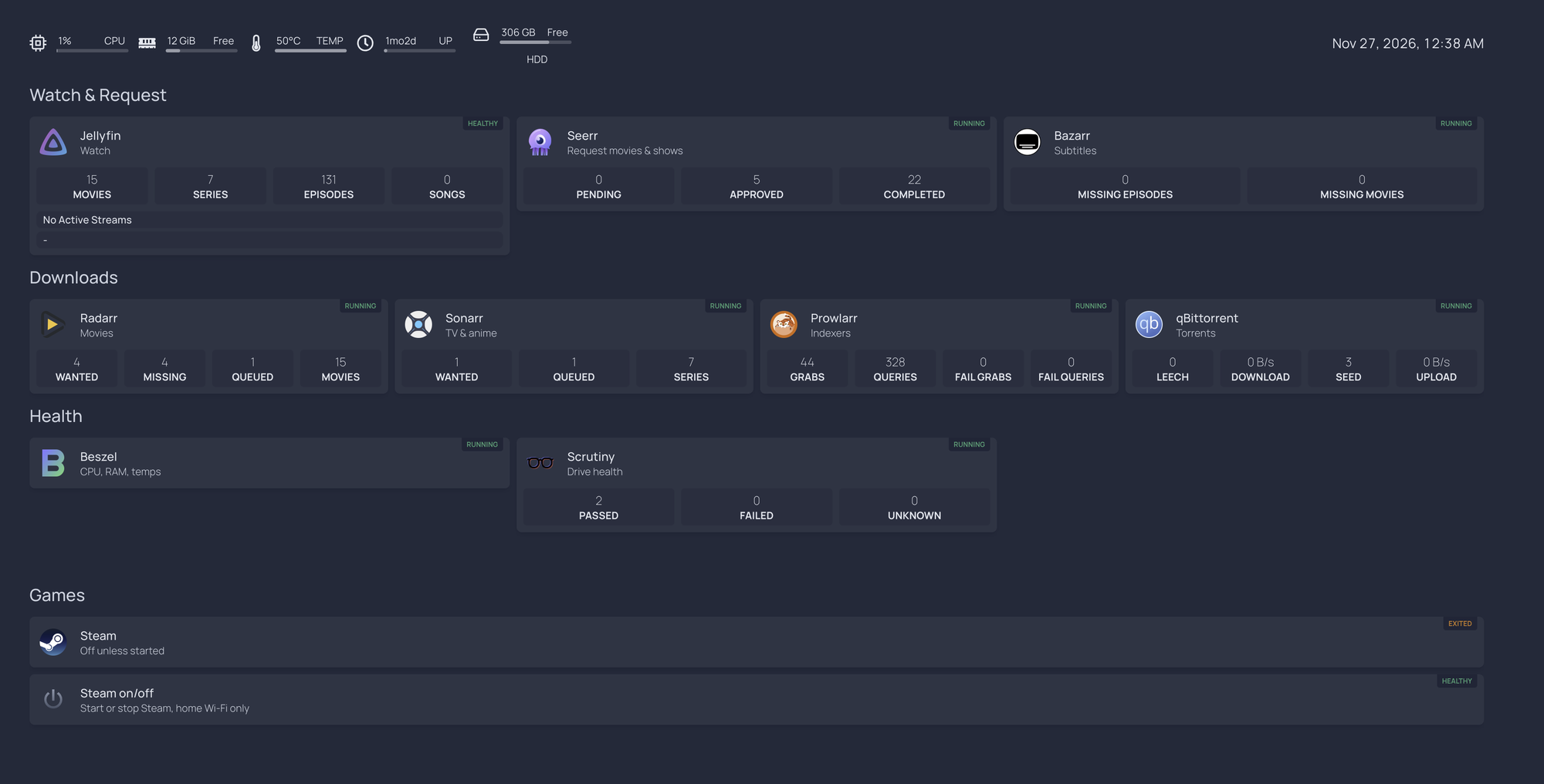
- Homepage: one dashboard on port 80 with every service, its status and live stats.
- AdGuard Home: DNS for the whole house, with ads blocked and DNS-over-HTTPS upstreams. The router hands out 1.1.1.1 as a fallback, so the internet still works when the laptop is off.
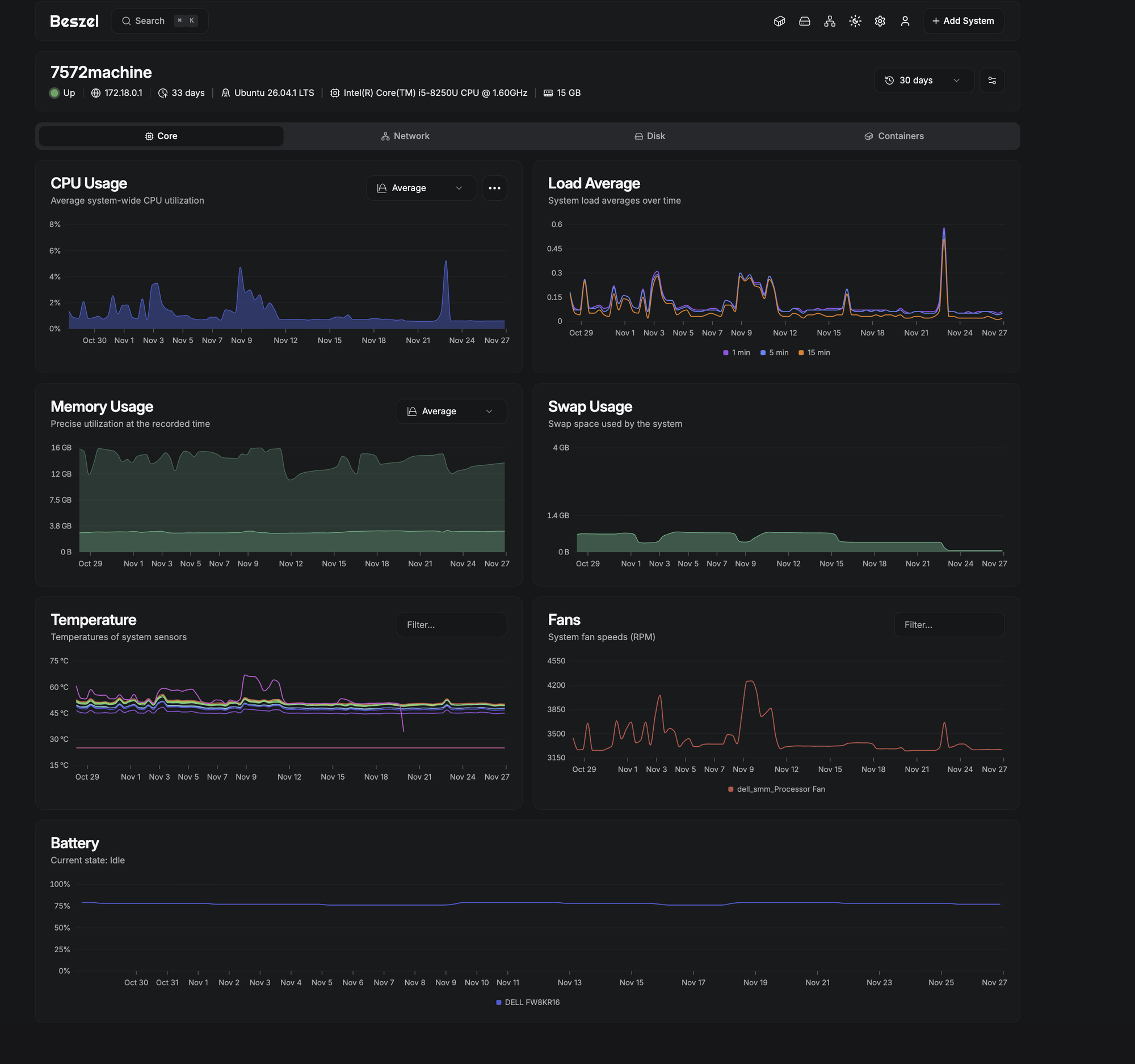
- Beszel: CPU, memory, temperatures and disk space over time.
- Scrutiny: reads SMART health from both drives every day and alerts my phone if one starts failing.
- Backups: a cron job stops the apps for about 20 seconds every Sunday at 4 AM, tars every config, keeps the last four, and sends "Backup OK" or "Backup FAILED" through ntfy.
Everything from my phone
With Tailscale, I can reach every one of these apps from my phone, at home or anywhere else: request a movie, check the dashboard, or SSH in to restart something.
- Why it's free: Tailscale's personal plan costs nothing. They make their money from companies, so a homelab with a few devices is well within the free tier.
- Why it's secure: it builds a private network on WireGuard, so traffic between my phone and the laptop is encrypted end to end and usually goes directly between the two devices. Tailscale's servers only help the devices find each other and swap keys; they can't read the traffic.
- Nothing is exposed: no ports are open on the router, so the server is invisible to the internet. Only devices signed in to my account can reach it.
Making a laptop behave like a server
A laptop wants to save battery, sleep when the lid closes, and spin down disks. A server wants none of that. The trick was to turn off the power saving that causes trouble and keep the parts that actually save power.
- Dedicated GPU off. The NVIDIA MX150 has no video encoder, so it cannot help Jellyfin anyway.
prime-select intelturns it off, and the Intel iGPU handles transcoding. - TLP instead of the default power daemon. It always runs in plugged-in mode, keeps PCIe and USB power saving off (more on why below), and never spins down the hard drive.
- Battery charges between 50% and 80%. The laptop is always plugged in, and keeping it at 100% wears the battery out. It's at 79% of its original capacity, which is still enough to act as a small UPS.
- Clean shutdown at 10%. If the power goes out for long, UPower shuts it down before the battery dies.
- No sleep, ever. All sleep targets are masked, closing the lid does nothing, and the screen turns off after one minute.
Trimming Ubuntu
A desktop install runs a lot that a headless server never needs. I turned off printing (cups), the mobile modem manager, location services and the file indexer, and hid the autostart items for calendar alarms, the update notifier, NVIDIA settings and the backup monitor. The qBittorrent desktop app went too, since only the Docker one is used. Each one is a line in my notes with the command to turn it back on.
Going wired
The laptop started on Wi-Fi, and Wi-Fi turned out to be the weakest part. The card (a Qualcomm QCA6174) has a flaky PCIe link: the logs were full of "PCIe Bus Error" lines, and with deep power saving on, it froze the whole laptop twice in one day.
So I switched to a wired connection. A USB 3 gigabit Ethernet adapter went into the laptop's 5 Gbps port, and it links at 1000 Mbps. Then I turned the Wi-Fi card off for good.
The test that mattered: a 4K remux played on the TV at about 77 Mbps, straight from Jellyfin, with no transcoding.
Trying Steam
I also experimented with Steam Headless, which runs Steam in a container so games can be streamed to other screens in the house. It works, but it's laggy, and AAA titles are out of reach for this hardware. It stays off by default, and a button on a small OliveTin page swaps it with the desktop when I want to try something light.
What broke
I wiped the hard drive. I ran mkfs.ext4 on the 1 TB drive expecting to recover the old data later. mkfs sends TRIM to the whole drive first, and this drive returns zeros after TRIM. The data was gone. The README now says in bold to never run mkfs or parted on that disk. And the empty /mnt/data folder on the SSD is locked with chattr +i, so if the hard drive ever fails to mount, apps fail loudly instead of quietly filling the small SSD.
Half the requests to TMDB failed. Seerr and Jellyfin get posters and metadata from api.themoviedb.org. About half of those connections got reset, while every other site worked. The filter was matching the hostname inside the first TLS packet (the ClientHello). If that packet goes out in two pieces, it never matches, so I wrote a 40-line Python proxy that does exactly that:
hello = await client_r.read(65536)
up_w.write(hello[:5])
await up_w.drain()
await asyncio.sleep(0.01)
up_w.write(hello[5:])
It runs as its own container, and only Seerr and Jellyfin use it. A free VPN did not help, because its exit was in India too.
The laptop froze. That was the Wi-Fi card above. Turning off PCIe power saving stopped it, and going wired made it irrelevant.
By the numbers
| Uptime | 33 days since the last reboot |
| Containers | 16 running |
| Load average | 0.02 at idle |
| CPU | Under 2% most of the month, peaks around 5% |
| Temperature | 45-55 °C, fan around 3,300 RPM |
| Requests | 22 completed through Seerr |
| Memory | 3.1 GB used of 15 GB. Jellyfin, the largest, uses about 300 MB |
| Media | 604 GB on a 1 TB drive |
| Network | 1000 Mbps link, 4K remux direct-played at about 77 Mbps |
| Backups | About 550 MB a week, last 4 kept |
| Battery | 79% health, held between 50% and 80% |
It's still a laptop
None of this locks the machine into being a server. Ubuntu's desktop is still there, so at any time I can open the lid, log in and use it as a normal laptop while the containers keep running in the background.
The next idea on the list is photos: Immich, an open-source, self-hosted alternative to Google Photos, could back up our phones to the same machine over Tailscale.
An old laptop turns out to be a good server: quiet, low on power, with a battery as a built-in UPS. The containers are the easy part. The work is in the small fixes that let it run for a month without me touching it.